Download Power Architect
One installer for Windows 10 and 11 (64-bit). It installs for your user only, needs no administrator rights, and updates itself when a new pilot build is published.
-
Run the installer
Open Power-Architect-Setup-….exe from your Downloads folder.
-
Allow the unsigned pilot build
Pilot builds are not code-signed yet, so Windows may show “Windows protected your PC”. Click More info, check that the app is Power-Architect-Setup-…exe, then click Run anyway.
Not every PC shows this prompt; if the installer opens straight away, carry on. If your company manages your PC, its policy may not offer “Run anyway”; ask your IT team to allow the file, or tell us and we will send a signed build when it is ready.
-
Choose where to install
Keep “Only for me”, click Next, accept the suggested folder in your user's programs folder, and click Install. It takes about a minute and adds Power Architect to the Start menu.
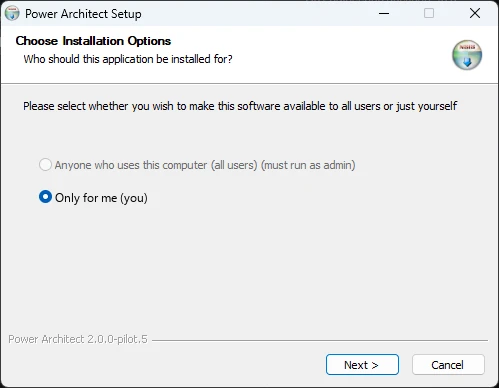
The installer's first page. No administrator rights are needed. -
Sign in with your invited email
Power Architect opens on its Welcome screen. Enter the email address your invitation went to and click Email me a sign-in link. Open the link from that email on the same computer: your browser says you are signed in, and the app continues by itself.
No password, and no API key on your machine: model requests go through your account. Email links work once and expire; if one does, request a new one from the same screen.
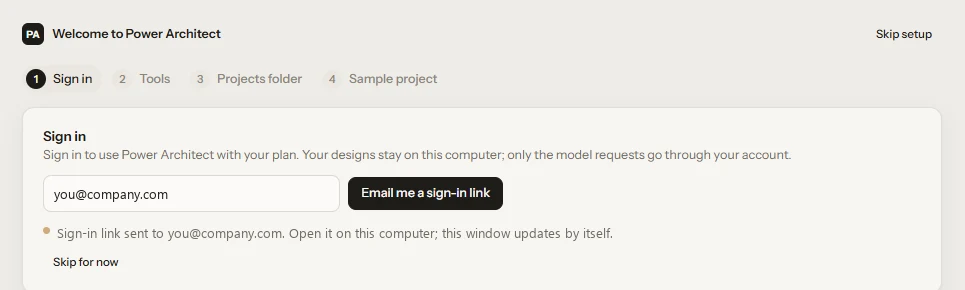
The first step of the Welcome flow after the link was sent. -
Let it fetch the tools it needs
The tool check shows what is ready. Python, ngspice and Git come with the installer. KiCad (about 250 MB), Java and Freerouting download from our release server when you click Install; FEMM and MATLAB are used if you have them. You can skip any of them and add them later from Doctor.
-
Start with the sample, or your own brief
A sample project (a 6.6 kW on-board charger) opens so the design views are not empty on day one. Start a new project by describing what you are building; the agent names the project and asks what it needs to know.
Updates and uninstalling
The app checks for a new pilot build when it starts, downloads it in the background and installs it when you close the app. To remove it: Windows Settings → Apps → Installed apps → Power Architect → Uninstall. Your project folders stay where they are.